Diving Into Digital Art: Understanding the 3D Jellyfish SVG Phenomenon
If you have spent any time browsing design marketplaces, crafting blogs, or digital art communities, you have likely come across the term 3D Jellyfish SVG. At first glance, it might sound like a niche file format for marine biology enthusiasts. In reality, it represents one of the most exciting intersections of vector graphics, layered design, and modern creative technology. Whether you are a hobbyist crafter, a professional graphic designer, or simply someone curious about digital art, understanding what a 3D Jellyfish SVG is and how it works can open up new creative possibilities. This article will walk you through everything you need to know, from the basics of SVG files to the magic of creating three-dimensional jellyfish art.
What Exactly Is an SVG File?
Before we dive into the jellyfish itself, it helps to understand the foundation: the SVG file format. SVG stands for Scalable Vector Graphics. Unlike raster images (such as JPEGs or PNGs) that are made up of a fixed grid of pixels, vector graphics are built from mathematical equations that define lines, curves, shapes, and colors. This means an SVG can be scaled up or down infinitely without losing any quality. A tiny jellyfish icon on a website and a giant mural-sized print can both come from the same SVG file, and both will look crisp and sharp.
SVG files are also text-based, meaning they can be edited with a simple code editor or, more commonly, with vector design software like Adobe Illustrator, Inkscape, or Affinity Designer. This flexibility makes SVGs a favorite among designers, crafters, and developers alike. They are lightweight, easy to modify, and widely supported across web browsers and cutting machines.
What Makes a Jellyfish SVG "3D"?
A standard jellyfish SVG might depict a flat, stylized jellyfish with simple lines and solid colors. A 3D Jellyfish SVG, on the other hand, uses clever design techniques to create the illusion of depth, volume, and dimension. This is typically achieved through multiple layers, gradients, shadows, highlights, and overlapping elements that mimic how light would interact with a real jellyfish in water.
Imagine the translucent bell of a jellyfish, the delicate trailing tentacles, and the subtle glow of bioluminescence. A well-designed 3D SVG captures these details by stacking layers of color and transparency. For instance, the bell might have a dark outer edge, a lighter middle section, and a bright highlight near the top to simulate a spherical shape. The tentacles might be arranged in different depths, some appearing closer and others farther away, to create a sense of movement and three-dimensionality.
It is important to note that a 3D Jellyfish SVG is not a true 3D model in the way that a .obj or .stl file is. You cannot rotate it in space or view it from every angle. Instead, it is a 2D vector file that looks three-dimensional thanks to artistic techniques. This makes it incredibly versatile for a wide range of projects.
The Role of Layers in Creating Depth
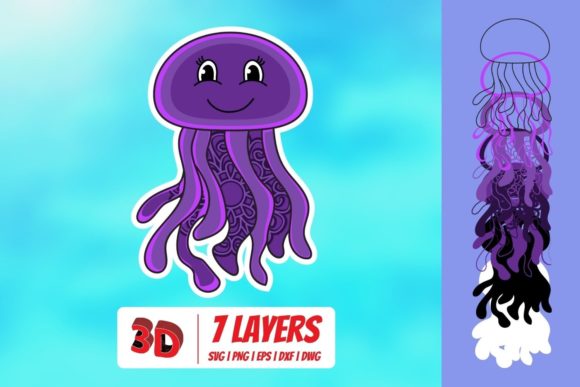
Layering is the secret sauce behind most 3D SVG designs. A typical 3D Jellyfish SVG might consist of several separate layers that stack on top of each other:
- Background layer: Often a dark or gradient background that suggests deep ocean water.
- Back tentacles: Tentacles that appear behind the bell, usually darker and slightly blurred in effect.
- Bell base: The main shape of the jellyfish cap, often with a gradient fill.
- Bell highlights: Lighter shapes that add a glossy or glowing effect.
- Front tentacles: Tentacles that appear in front of the bell, often lighter and more detailed.
- Details and accents: Small dots, lines, or glow effects that add realism.
When these layers are combined, they create a rich, immersive image that feels alive. Many designers also use opacity and blending modes to make the jellyfish appear translucent, just like the real creature.
Why Are 3D Jellyfish SVGs So Popular?
The popularity of 3D Jellyfish SVGs can be attributed to several factors, all rooted in their aesthetic appeal and practical versatility.
1. Visual Impact
Jellyfish are inherently mesmerizing creatures. Their ethereal, flowing forms and gentle bioluminescence make them a favorite subject for artists and designers. A 3D SVG captures that magic in a way that a flat illustration simply cannot. The added depth and dimension make the jellyfish feel almost real, drawing the viewer in.
2. Versatility Across Media
Because SVGs are scalable and editable, a 3D Jellyfish SVG can be used in countless ways. It works beautifully for:
- Web design: As a hero image, background element, or icon.
- Print design: Posters, flyers, apparel, and packaging.
- Crafting: Cutting machines like Cricut or Silhouette can interpret SVG layers to create multi-layered paper art, stickers, or iron-on designs.
- Digital art: As a standalone piece or part of a larger composition.
- Education: Visual aids for marine biology or art lessons.
3. Creative Flexibility
Unlike a photograph, which captures a specific jellyfish in a specific moment, an SVG is entirely customizable. You can change colors, resize elements, remove layers, add text, or combine it with other graphics. This makes it a powerful tool for branding, storytelling, and personal expression.
4. Accessibility
SVG files are widely supported and easy to use. Many online marketplaces offer affordable or even free 3D Jellyfish SVGs, and basic editing requires only free software. This lowers the barrier to entry for beginners who want to create professional-looking designs without investing in expensive tools or training.
Practical Applications in Modern Life
The 3D Jellyfish SVG is not just a pretty picture. It has real-world applications that touch various aspects of modern life, work, and creativity.
In Business and Branding
A tech startup or an ocean conservation nonprofit might use a 3D jellyfish as a logo or brand element. The jellyfish symbolizes adaptability, intelligence, and mystery. Its 3D appearance conveys a sense of innovation and depth, making the brand appear more sophisticated and memorable. Because the SVG can be resized without loss, it works equally well on a business card, a website, or a billboard.
In Education and Science Communication
Teachers and science communicators often use 3D Jellyfish SVGs to explain marine biology concepts. The layered design helps students visualize the anatomy of a jellyfish, including the bell, oral arms, and tentacles. The ability to edit the SVG means educators can label parts, highlight specific structures, or create interactive diagrams for online learning modules.
In Home Decor and Crafting
One of the most popular uses of 3D Jellyfish SVGs is in paper crafting. Using a cutting machine, crafters can cut each layer of the SVG from different colored cardstock and assemble them into a physical, three-dimensional piece of art. These layered paper jellyfish make stunning wall decor, greeting cards, or gift tags. The tactile quality of the finished piece adds another dimension to the digital design.
In Digital Content Creation
YouTubers, streamers, and social media influencers use 3D Jellyfish SVGs as overlays, backgrounds, or thumbnails. The glowing, oceanic aesthetic fits well with relaxation, meditation, or gaming content. Because SVGs are lightweight and scalable, they load quickly and look crisp on any screen size.
Common Misunderstandings About 3D Jellyfish SVGs
As with any popular digital asset, there are a few common misconceptions worth clearing up.
Misunderstanding 1: "3D SVG means I can view it from any angle."
As mentioned earlier, a 3D SVG is a 2D file that uses artistic techniques to simulate depth. It is not a rotatable 3D model. If you need a true 3D model for animation or virtual reality, you would use a different file format like .glb or .fbx. However, for most design and crafting purposes, the illusion of 3D is more than sufficient.
Misunderstanding 2: "All 3D Jellyfish SVGs are the same."
Far from it. Styles vary widely, from realistic and highly detailed to minimalist and abstract. Some designers focus on bioluminescent glow effects, while others emphasize flowing tentacles or geometric patterns. When choosing an SVG, look for one that matches the tone and purpose of your project.
Misunderstanding 3: "I need advanced software to use an SVG."
While professional software offers more control, many free tools like Inkscape, Gravit Designer, and even web-based editors like Canva can open and edit SVG files. For cutting machine users, the software that comes with the machine (Cricut Design Space or Silhouette Studio) handles SVG imports with ease.
Tips for Working with 3D Jellyfish SVGs
Whether you are a beginner or an experienced designer, here are some practical tips to get the most out of your 3D Jellyfish SVG:
- Check the layer structure. Before using the file, open it in a vector editor and look at the layers. Understanding how the file is built will help you customize it effectively.
- Experiment with colors. Jellyfish come in a stunning range of colors, from deep purple to neon pink to translucent white. Try changing the gradients to fit your brand or mood.
- Use glow effects sparingly. Bioluminescence is a key feature of many jellyfish. Adding a subtle outer glow or drop shadow can enhance the 3D effect without overwhelming the design.
- Pair with ocean elements. Bubbles, seaweed, or light rays can complement the jellyfish and create a cohesive underwater scene.
- Test scalability. Always test your SVG at the size you intend to use it. While vector files scale infinitely, very small details might become lost at smaller sizes if not designed carefully.
The Future of 3D SVG Design
The trend toward 3D vector graphics is likely to continue as design tools become more powerful and accessible. We are already seeing SVGs that incorporate CSS animations, allowing the jellyfish to float, pulse, or glow on a web page without any JavaScript. Some designers are experimenting with isometric and pseudo-3D perspectives that push the boundaries of what SVG can do.
For the jellyfish specifically, its enduring appeal lies in its elegance and mystery. As a subject, it invites creativity and rewards experimentation. The 3D Jellyfish SVG is more than a file type; it is a canvas for imagination.
Final Thoughts
Understanding the 3D Jellyfish SVG means appreciating both the technical foundation of scalable vector graphics and the artistic techniques that create depth and dimension. Whether you are layering paper for a handmade card, designing a website header, or teaching students about ocean life, this versatile asset offers something unique. It bridges the gap between digital precision and organic beauty, making it a valuable tool for creators of all skill levels. So the next time you see a glowing jellyfish floating across a screen or a piece of paper, you will know exactly how it came to life, and how you can create your own.