Monitor Mockup 3D: Realistic Displays for Any Project
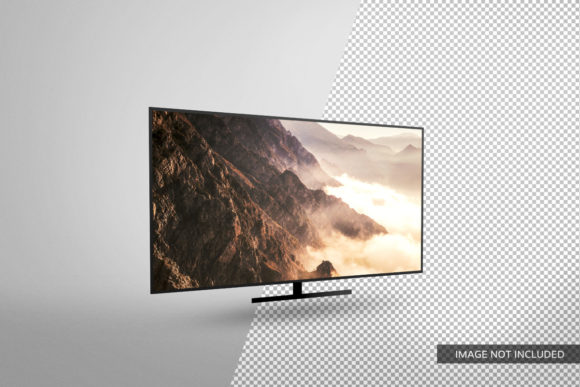
When you need to present a website, app, or video in a way that feels real, a static screenshot rarely does justice. That’s where Monitor Mockup 3D comes in. It’s a digital asset—typically a high-resolution render or 3D model—that places your digital content onto a realistic monitor screen, complete with angles, lighting, and depth. The result is a presentation that looks like a photograph of an actual device, not a flat image. Whether you’re pitching a design to a client or adding visual flair to a blog post, this tool can bridge the gap between your work and how others perceive it.
But not everyone approaches Monitor Mockup 3D the same way. A graphic designer may prioritize customization and realism, while a small business owner might care more about speed and cost. Understanding these differences helps you decide if and how such a mockup fits your workflow.
What Makes a Good Monitor Mockup 3D?
At its core, a monitor mockup is a container for your screen content. The “3D” aspect means the monitor is angled, rotated, or integrated into a scene—perhaps on a desk, against a wall, or floating in space. Key elements include texture (matte or glossy screen), bezel thickness, reflections, and shadows. A high-quality mockup can make a simple landing page look like a product shot from a major tech brand.
Different audiences weigh these features differently. For instance, a beginner might be happy with a free drag-and-drop mockup that just swaps images in a template. An experienced creator often needs layered PSD files with smart objects, adjustable lighting, and the ability to change the background. The same mockup can serve both, but the ease of use versus flexibility trade-off matters.
Designers and Creative Professionals
For UI/UX designers, graphic artists, and web developers, Monitor Mockup 3D is almost a daily tool. Presenting a wireframe or a finished interface on a realistic monitor adds context. A client is more likely to approve a design when they see it in a lifelike environment. Professionals often look for quality—high resolution, accurate colors, and subtle details like screen glare or ambient shadows. They may also need speed: a mockup that takes seconds to update (via smart layers) saves hours during revisions.
Example: A freelance designer creating a portfolio piece for a banking app could use a Monitor Mockup 3D set on a modern desk with a coffee cup. The setting implies a professional workspace, reinforcing the app’s business focus. The designer would likely choose a mockup with a clean, minimal bezel and natural lighting to keep attention on the screen.
Marketers and Entrepreneurs
If you run a small business or market digital products, you need visuals that convert. Monitor Mockup 3D helps create ads, social media banners, and website hero images that look polished without a photo studio. Entrepreneurs often care about commercial value – a mockup that works for multiple campaigns or products. They may also prioritise cost; a single high-quality mockup can be reused for dozens of screenshots.
Example: A SaaS founder launching a new dashboard feature could use a Monitor Mockup 3D in a tweet or a product hunt announcement. The realistic presentation instantly communicates “this is a modern, professional tool.” They might pick a mockup with a slightly tilted angle to create a dynamic, eye-catching image that stands out in a feed.
Educators, Bloggers, and Content Creators
Teachers creating online courses, bloggers writing tech tutorials, or YouTubers making preview images all rely on clear visuals. For them, learning value and clarity matter most. A Monitor Mockup 3D can make a screenshot of a software interface feel approachable. Instead of a bland rectangle, the content sits inside a device, helping viewers connect the tutorial to their own screen.
Example: A coding instructor creating a lesson on responsive design might show three Monitor Mockup 3D images side-by-side, each with a different viewport size. The 3D context (different angles or monitor shapes) immediately communicates the concept of screen sizes without extra explanation. This saves the educator time and makes the lesson more engaging.
Hobbyists and Consumers
Even if you’re not a professional, Monitor Mockup 3D can add a professional touch to personal projects. Hobbyists who create fan sites, custom widgets, or personal portfolios use mockups to impress friends or potential collaborators. For them, ease of use is king—no need for advanced Photoshop skills. Online generators that let you upload an image and get a mockup in seconds are perfect.
Example: A student building a personal website for a job application can use a free Monitor Mockup 3D generator to create a header image showing their own homepage. That small touch makes the page feel more complete and demonstrates that the student pays attention to detail.
Comparing Priorities: What to Look For
Deciding on a Monitor Mockup 3D depends on your specific needs. Here’s how different aspects align with various user groups:
- Ease of Use – Begins with drag-and-drop, online tools, or simple smart object templates. Perfect for non-designers and busy business owners who want results in minutes.
- Quality and Realism – Demanded by experienced designers and marketers creating large-format prints or high-resolution web displays. Look for 4K renders, true-to-life reflections, and accurate perspective.
- Flexibility – Customizable mockups (change screen, background, shadows, angle) appeal to professionals who need to match a brand identity or create a series of visuals.
- Cost – Free mockups exist, but they often trade off quality or uniqueness. Paid mockup bundles or individual files from marketplaces (like Envato or Creative Market) offer better support and more options. Hobbyists may prefer free, while businesses see value in investing.
- Speed – If you produce content daily, a fast generator or a PSD with smart objects that auto-update can save hours each week. Marketers and social media managers often prioritize this.
- Commercial Use and Licensing – Always check if the mockup can be used for client work, merchandise, or advertising. Professionals must verify licenses to avoid legal issues.
For Beginners: Getting Started Without Overwhelm
If you’re new to mockups, start with a free online tool like MockupWorld or Previewed. These sites often have a “Monitor Mockup 3D” section where you upload your image and download a ready-to-use file. No software required. A beginner can create a professional-looking mockup for a social media post in under two minutes. The key is to pick a simple scene—a monitor on a plain background—so your content stays the focus.
For Intermediate Creators: Adding Polish with Layers
Once you want more control, move to PSD or Figma mockups. These allow you to adjust lighting, change the desk or wall texture, and even swap out the monitor model (e.g., from an iMac to a curved ultra-wide). If you run a design blog, you can create a consistent look for all your tutorial images by using the same mockup with different screens. This builds a cohesive brand. Flexibility becomes your friend.
For Advanced Professionals: Crafting Bespoke Scenes
Some designers build their own Monitor Mockup 3D from scratch using Blender, Cinema 4D, or Adobe Dimension. This is the ultimate in creativity and uniqueness. You can match the lighting to the product’s brand, add custom props, and render at any resolution. This approach is time-consuming but delivers unmatched results for major client presentations or ad campaigns. If you frequently need bespoke visuals, investing time in learning 3D software can pay off.
Does Monitor Mockup 3D Fit Your Needs?
Before you download or buy a mockup, ask yourself a few questions. What is the final output? A web banner might only need a simple front-facing mockup; a billboard ad demands exceptional detail. How often will you use it? A one-off project probably doesn’t justify a paid bundle; frequent content creators should consider a library. Who is the audience? A corporate client expects polished, subtle realism; a fashion brand might want edgy angles and dramatic shadows. What is your skill level? If you don’t know what a “smart object” is, start with an online generator and learn step-by-step.
For many, a single high-quality Monitor Mockup 3D file can serve multiple purposes: portfolio pieces, social media previews, presentation slides, and even printed promotional materials. It’s a small investment that elevates how others see your work. The mockup itself fades into the background—the screen content becomes the star, but it’s the 3D context that makes that content feel real and valuable.
Whether you’re a beginner trying to impress your first client, an educator building a course, or a marketing professional launching a product, the right Monitor Mockup 3D can transform a flat screenshot into a compelling visual story. Choose based on your priorities, experiment with a few styles, and watch how your presentations come to life.