Black 3d Editable Text Effect: A Practical Guide to Bold Design
Typography is a cornerstone of visual communication. The words you choose matter, but how you present them can make the difference between content that is overlooked and content that commands attention. One of the most enduring and versatile approaches to making text stand out is the black 3d editable text effect. This technique combines deep, bold color with dimensional depth, offering a professional and striking look that works across many mediums. Understanding how to use it effectively—and knowing where it fits into your larger design goals—can elevate everything from social media graphics to brand presentations.
What Is a Black 3d Editable Text Effect?
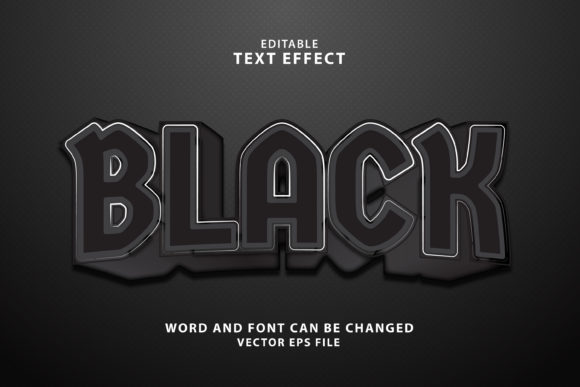
At its core, a black 3d editable text effect is a styling technique applied to type that gives the illusion of three-dimensional depth while keeping the text fully editable. Unlike rasterized text, where letters become flat images, editable text remains live within design software. This means you can change the wording, adjust the font, or tweak the kerning without having to rebuild the entire effect from scratch.
The "black" element refers to the base color of the text, often using rich, dark shades to create contrast and a sense of weight. The 3D aspect is typically achieved through layers of offset shadows, beveled edges, gradient fills, or extrusion effects that simulate height and depth. When applied thoughtfully, the result is typography that feels substantial, modern, and highly readable.
Why Designers and Content Creators Choose This Effect
There are several practical reasons why the black 3d editable text effect has remained popular among both professionals and hobbyists. Understanding these motivations helps you decide if it is the right approach for your project.
Need for Readability and Impact
One of the biggest challenges in design is making text legible without sacrificing visual interest. Light text on busy backgrounds often gets lost. Black text, by nature, offers high contrast against lighter or colorful backdrops. Adding a 3D effect enhances this further by creating separation between the letters and the background. The shadow layers and depth effects ensure that even on complex images or textured surfaces, your message remains clear and impactful.
Desire for a Professional Finish
Flat typography can sometimes feel incomplete or amateurish, especially in contexts like product packaging, video titles, or website headers. A three-dimensional treatment adds polish and a sense of craftsmanship. The black 3d editable text effect, in particular, conveys sophistication because the dark color palette avoids the sometimes overly playful or cartoonish feel of bright 3D text. It lends itself well to serious, corporate, or high-end branding while still offering creative flexibility.
Time Efficiency and Reusability
Editable text effects save significant time. Instead of manually creating a new 3D text layer for every project, you can build a reusable preset or template. Once you define the extrusion depth, lighting angle, and shadow parameters, you can apply the effect to any text you type. This is especially valuable for content creators who produce frequent social media posts, YouTube thumbnails, or presentation slides. The ability to edit the text without redoing the effect means less repetitive work and more consistent output.
Practical Applications of Black 3d Editable Text
The black 3d editable text effect is not a one-size-fits-all solution, but it does excel in several specific use cases. Knowing where to apply it increases its effectiveness and ensures your design feels intentional rather than overdone.
Video Titles and Thumbnails
On platforms like YouTube, Instagram Reels, and TikTok, the title text on a thumbnail often determines whether a viewer clicks. Bold, dimensional black text stands out against bright or busy background images. It creates a focal point that is easy to read even at small sizes on mobile screens. Many top creators use a variant of this effect to give their branding a consistent, professional look that viewers recognize instantly.
Brand Logos and Wordmarks
For businesses that want a strong, grounded visual identity, a black 3d text effect can form the basis of a logo. The depth adds a sense of durability and permanence. When the text remains editable, it also allows the brand to adjust taglines or secondary text without commissioning a completely new logo file.
Product Packaging and Mockups
In packaging design, dimensional text can simulate raised or embossed lettering on boxes, bottles, or labels. A black 3d editable text effect is especially useful for premium or luxury products where clean, dark typography communicates quality. Designers can quickly produce realistic mockups for client presentations without needing physical samples.
Web and UI Headings
While overly decorative text is often discouraged in UI design, subtle 3D treatment on hero headings or call-to-action buttons can add a tactile feel to digital interfaces. Black text with a soft extrusion or drop shadow can create a button that looks clickable and prominent. Editable effects allow developers and designers to collaborate more easily, as text changes can be made without recreating assets.
How Different Users Approach the Black 3d Editable Text Effect
No two creators work exactly the same way. Your approach to this effect will depend on your skill level, the tools you use, and the final output you need. Here is how various users typically engage with black 3d editable text.
Beginner Designers
If you are new to design, starting with a pre-built layer style or template is the most straightforward path. Many software programs, including Adobe Photoshop and Illustrator, offer built-in 3D text effects that can be customized. Beginners should focus on adjusting the extrusion depth and shadow opacity to achieve a look that is noticeable but not overwhelming. A common mistake is to overdo the depth, making the text look disconnected or hard to read. Start with a shallow extrusion and increase gradually.
Advanced Users and Motion Designers
Experienced designers often take advantage of software like Cinema 4D, Blender, or After Effects to create fully adjustable 3D text that integrates with lighting and camera movements. In these cases, the black 3d editable text effect becomes part of a larger animated scene. The key consideration here is maintaining editability through expressions or linked text layers, so last-minute copy changes do not break the animation. Advanced users also pay close attention to material properties—such as roughness, reflectivity, and ambient occlusion—to make the black surface feel realistic rather than flat.
Social Media and Content Managers
For those who manage multiple platforms and need to produce content quickly, editable templates in Canva, Figma, or Photoshop are essential. These users prioritize speed and consistency. They look for templates that include smart objects or text layers labeled clearly. The main challenge is ensuring the effect scales properly across different aspect ratios and resolutions. A black 3d editable text effect that works well on a horizontal YouTube thumbnail might need adjustment for a vertical Instagram story.
Recommendations for Getting the Best Results
To make the black 3d editable text effect work for you, consider these practical tips.
- Choose the right font. Thick, bold typefaces with clean lines respond best to 3D extrusion. Thin or highly decorative fonts can lose their shape and become illegible when depth is added.
- Control the lighting. The source of light in your effect determines where shadows fall. Consistent lighting across all your text elements creates a cohesive look. If you have multiple text blocks, make sure the light direction matches.
- Limit the depth. More is not always better. A moderate extrusion depth often looks more realistic and professional than an extreme one. Think about how thick the text would be if it were a physical object.
- Use color strategically. Black does not have to mean pure #000000. A very dark charcoal or deep black-blue can add subtle richness without losing the "black" identity. This is especially useful when the text appears on a pure white background.
- Test legibility at different sizes. What looks impressive on a large monitor may become muddy on a small phone screen. Always preview your design at the size it will actually be viewed.
Common Challenges and How to Overcome Them
Even with careful planning, you may encounter issues when working with black 3d editable text. Being aware of these challenges helps you address them early.
Challenge: The text looks flat despite having 3D settings applied. This often happens when the extrusion color is too similar to the front face color. Ensure there is enough contrast between the front of the letters and the extruded sides. A slight gradient on the extrusion can also help define depth.
Challenge: The file size becomes too large. Complex 3D effects, especially those with multiple shadow layers or high-resolution textures, can bloat your file size. Use layer styles and effects instead of rasterized layers whenever possible. For motion graphics, consider rendering the text as a video clip with an alpha channel if editability is no longer needed.
Challenge: The text does not seem to match the style of surrounding elements. A black 3d editable text effect is bold by nature. If your overall design uses flat, minimalist elements, the dimensional text can feel out of place. Introduce subtle depth to other elements, such as buttons or icons, to create visual harmony. Alternatively, use the effect sparingly—perhaps on the main headline only—to let it stand out as a deliberate accent.
Thinking About Accessibility and Inclusivity
While the black 3d editable text effect is visually striking, it is important to consider how it performs for all viewers. Text with heavy shadows or extreme extrusion can be difficult for people with visual impairments to read. If you are using this effect for essential content, such as marketing headlines or presentation slides, ensure there is enough contrast between the text and the background. Avoid placing dark 3D text on dark backgrounds. When possible, provide a plain text alternative or ensure the effect is applied mainly to decorative rather than informational content.
Final Considerations for Your Projects
The black 3d editable text effect is a tool, not a solution in itself. Its real value comes from how you integrate it into your broader design workflow. Whether you are creating a single social media graphic or a full brand identity, the goal is always to serve the message, not overwhelm it. When used thoughtfully, this effect adds weight, clarity, and a professional edge that resonates with audiences looking for quality and reliability.
Take the time to build your own reusable template. Experiment with different extrusion depths, shadow angles, and background pairings. Over time, you will develop an intuitive sense for when the effect enhances your content and when a simpler treatment would serve better. The most effective designers are those who know how to use powerful tools with restraint, and the black 3d editable text effect is no exception. By focusing on readability, consistency, and purpose, you can create text that not only looks great but also communicates with confidence.