Wood 3D Editable Text Effect: A Designer’s Guide to Natural Depth and Texture
Typography in design has moved far beyond flat, static letters. Today, the demand for rich, tactile visuals means that text must feel almost tangible. Among the many stylistic directions you can take, the Wood 3D Editable Text Effect stands out as a compelling blend of natural warmth and dimensional clarity. It transforms standard letterforms into carved, layered, or embossed typography that mimics real wood grain, knots, and organic textures. For designers, content creators, and brand developers, understanding how to leverage this effect effectively can elevate a project from ordinary to memorable.
This article explores the core qualities of the Wood 3d Editable Text Effect, how it fits into modern creative workflows, and practical considerations for choosing and using it. Whether you are crafting a rustic logo, a nature-themed website header, or a product label for artisanal goods, this technique offers versatility that few other text treatments can match.
What Makes the Wood 3D Editable Text Effect Distinctive
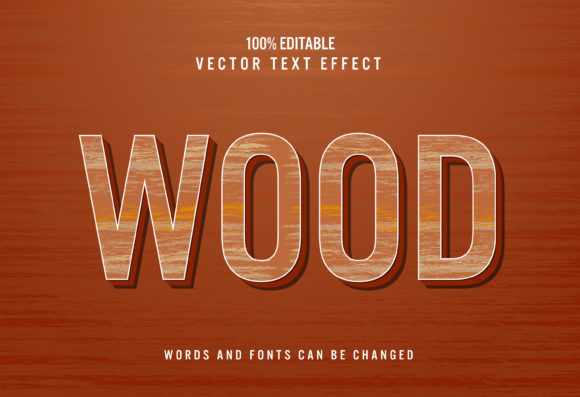
At its most basic level, the Wood 3d Editable Text Effect combines three core visual elements: depth, texture, and material realism. The three-dimensional aspect gives the letters physical presence, often through bevels, extrusions, or carved shadows. The wood component introduces organic variations such as grain direction, color shifts between heartwood and sapwood, and subtle imperfections like small cracks or rings.
One of the key functions of this effect is its editability. Unlike a rasterized image of wooden text, an editable effect allows you to change the word, adjust the letter spacing, or tweak the font style without rebuilding the entire visual. This is a massive time-saver in iterative design processes. You can swap out copy for different product names, update taglines, or localize text for different markets while maintaining the exact same wood appearance and three-dimensional lighting.
The effect typically relies on layer styles, smart objects, or procedural textures inside graphic design software. It can also be achieved through CSS3 transforms and gradients for web use, or via 3D modeling applications for rendered scenes. Regardless of the tool, the outcome is a piece of typography that feels as if it could be touched — warm, grounded, and substantial.
Key Qualities and Characteristics to Look For
Not all wood text effects are created equal. When evaluating or creating a Wood 3d Editable Text Effect, consider these essential characteristics:
Grain Realism and Variation
The most convincing effects use multiple grain patterns that follow the natural contours of the letters. Straight grain works well for tall, narrow characters, while curved grain suits rounded letters like O or S. High-quality effects layer grain at different scales — fine lines for close-up detail and broader bands for overall structure.
Lighting and Shadow Consistency
Three-dimensionality depends entirely on how light interacts with the letter surfaces. Look for effects that include ambient occlusion, highlights on raised edges, and soft drop shadows that anchor the text to the background. The light source should remain consistent across all letters to avoid a disjointed appearance.
Color Depth and Tonal Range
Wood is never a single flat brown. The best effects incorporate multiple hues — warm ochres, deep mahogany, pale birch, or even weathered gray tones. Gradients that mimic the natural lightening and darkening of wood fibers add authenticity. A good effect will also allow you to tint or recolor the wood without losing the 3D shading.
Editable Parameters
True editability means you can adjust the bevel depth, the extrusion length, the angle of the light, and the texture scale. Some premium effects come with slider controls in software like Adobe Photoshop or Affinity Photo, letting you fine-tune the appearance in real time. The less you need to start from scratch, the more practical the effect becomes for real-world projects.
Where the Wood 3D Editable Text Effect Shines in Modern Workflows
The applications for this text effect span multiple industries and media types. Its natural aesthetic makes it particularly effective for projects that need to communicate authenticity, craftsmanship, or a connection to nature.
Branding for Artisanal and Organic Products
Small-batch food producers, handcrafted furniture makers, organic skincare lines, and craft breweries often use wood typography to reinforce their earthy brand identity. A logo rendered with the Wood 3d Editable Text Effect immediately suggests quality materials, traditional methods, and environmental consciousness. Unlike a generic serif or sans-serif logo, the wood texture adds a unique signature that is hard to replicate.
Web and App Design with a Rustic Theme
For websites centered on outdoor activities, cabin rentals, farming, or conservation, wood text effects in headers and call-to-action buttons create a cohesive thematic experience. Because the effect is editable, you can maintain the same wood style across different page titles and menu items without exporting multiple image files. This helps with site performance and consistency.
Print Media and Packaging
In print, the effect can be used for wine labels, gift boxes, menus, and signage. The 3D aspect works beautifully with embossing or foil stamping, but even in digital print, the optical illusion of depth catches the eye. For packaging mockups, applying the Wood 3d Editable Text Effect to product names or descriptions lets clients visualize the final look before production.
Social Media and Video Content
Short video introductions, lower thirds, or thumbnail text benefit from the tactile quality of wood text. It stands out against clean backgrounds and resonates with audiences seeking warmth and familiarity. Because the effect is often built using layer-based tools, you can animate the lighting or rotation in video editing software to add subtle motion.
Practical Benefits That Go Beyond Aesthetics
Choosing a Wood 3d Editable Text Effect over other text styles offers several practical advantages that affect both the design process and the final output.
- Time efficiency: Once you set up the effect, changing the copy takes seconds. This is invaluable when working with client revisions or A/B testing different headlines.
- Scalability: Vector-based or smart-object effects scale cleanly from favicon size to billboard dimensions without losing detail or introducing pixelation.
- Consistency across media: The same editable file can produce assets for web, print, and video, ensuring brand uniformity.
- Reduced file bloat: Compared to embedding high-resolution wood texture images for every letter, an editable effect keeps file sizes manageable.
- Creative flexibility: You can experiment with different wood species — walnut, oak, pine, teak — by swapping texture maps or adjusting color sliders, all while keeping the 3D structure intact.
Considerations Before Choosing or Creating the Effect
While the Wood 3d Editable Text Effect is powerful, it is not a one-size-fits-all solution. Here are factors to weigh before integrating it into your project.
Font Selection Matters More Than You Think
Not every typeface works well with a wood texture and 3D extrusion. Thick, bold fonts with clean contours tend to read best because the grain and shadows remain visible. Thin, delicate fonts can lose detail or become muddy when beveled. Serif fonts often evoke a classic, carved-in-wood feel, while rounded sans-serifs can mimic polished wooden toys or signage. Always test the effect with your chosen font at different sizes before committing.
Background and Context Compatibility
The wood effect needs room to breathe. Busy or highly textured backgrounds can clash with the grain, making the text hard to read. Plain backgrounds, soft gradients, or subtle patterns that complement the wood tone work best. Consider the lighting direction in the text effect relative to the background image — conflicting light sources break the illusion of depth.
Performance in Real-Time Environments
For web or mobile use, heavy 3D text effects can slow down rendering if not optimized. CSS-based approaches or compressed image sprites are preferable to full-resolution texture maps. If you use a layered PSD or AI file for web mockups, export the final text as a WebP or SVG to maintain quality while keeping load times low.
License and Source Quality
If you are purchasing or downloading a Wood 3d Editable Text Effect from a marketplace, check the license terms. Some effects limit commercial use, require attribution, or restrict modifications. Also inspect the resolution of the texture maps — low-resolution wood grain becomes blurry at scale, undermining the 3D effect.
Examples and Scenarios in Practice
Imagine you are designing a website for a mountain lodge. Using the Wood 3d Editable Text Effect for the lodge name in the hero section immediately sets a rustic tone. The warm brown tones echo the log cabin aesthetic, while the 3D bevel mimics carved signage. Below, you use a lighter version of the same effect for secondary headings, maintaining visual harmony.
For a craft whiskey label, the effect can simulate burned or toasted wood lettering, pairing well with gold foil accents. The editability allows you to quickly change the batch number or year without redoing the artwork. Similarly, an organic honey jar label benefits from a honey-hued wood text that suggests natural purity and traditional beekeeping.
In a mobile app for wilderness guides, wood text effects on the splash screen and main menu create an immersive feel from the first tap. The editable nature means you can localize the text for different languages while preserving the exact wood appearance, which is a significant advantage for global releases.
Even in educational materials, such as a poster about forest conservation, wood text effects can visually reinforce the subject matter. The 3D aspect makes the title prominent, drawing viewers in before they read the supporting information.
Final Observations on Adopting the Wood 3D Editable Text Effect
The Wood 3d Editable Text Effect is more than a passing trend. It addresses a fundamental human preference for natural textures and tangible depth in a digital world. By keeping the effect editable, designers maintain control and flexibility, which is essential in fast-paced creative environments.
When used thoughtfully, this text treatment adds warmth, authenticity, and visual hierarchy to a wide range of projects. The key is to balance realism with readability, and to choose fonts, colors, and lighting that serve the overall composition rather than overpower it. Whether you are a seasoned designer or a hobbyist exploring new styles, the Wood 3d Editable Text Effect offers a rewarding way to make your words stand out — naturally and memorably.