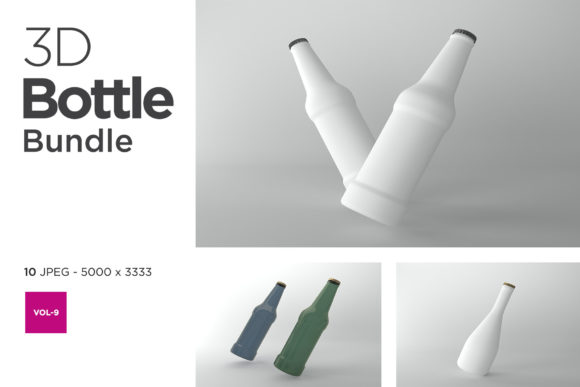
How to Get the Most Out of the 3D Bottle Mockup Bundle Vol-9
You have spent hours perfecting your bottle label. The typography is crisp, the colors match your brand guidelines, and the layout feels balanced. Then you drop that design into a flat rectangle and show it to a client or upload it to your online store. The result is underwhelming. A two-dimensional representation simply cannot convey how the label will wrap around a bottle, how light will catch the surface, or how the product will look on a shelf next to competitors. This is where the 3D Bottle Mockup Bundle Vol-9 comes in. It gives you a set of ready-made, lifelike scenes that transform your flat artwork into professional product visuals. But as with any powerful tool, using it effectively requires more than just dragging and dropping. Many people waste time and produce mediocre results because they overlook key details. Let us walk through the common pitfalls and, more importantly, how to sidestep them.
Choosing the Right File Format for Your Workflow
One of the first areas where people stumble is file format compatibility. The 3D Bottle Mockup Bundle Vol-9 typically includes layered PSD files, but you may also find smart object variants or even render-ready 3D scene files. A common mistake is assuming that any image editor can handle these files. If you open a highly complex PSD in a free online tool, you lose the ability to edit smart objects, adjust layer styles, or fine-tune lighting. The result is a static image that looks nothing like the preview.
Before you download or purchase the bundle, check what software you have. Adobe Photoshop is the most common environment for these mockups because smart objects and adjustment layers are fully editable. Some bundles also provide 3D scene files for software like Blender or Cinema 4D, which require a different skill set. If you are a beginner without access to professional editing tools, look for mockups that include pre-rendered, easy-to-use layer-based files. The 3D Bottle Mockup Bundle Vol-9 often caters to both levels, but always read the product description carefully. A ten-minute compatibility check can save you from a frustrating afternoon of broken layers.
Resolution and Output: More Pixels, Fewer Surprises
Another overlooked detail is the resolution of the mockup files. When you are designing for social media, a 72 dpi image might look acceptable on a phone screen. But if you plan to print the visual on a brochure, a poster, or even as part of a product catalog, low resolution becomes painfully obvious. The sharp edges of your label turn fuzzy, and the bottle itself may appear soft or pixelated.
The 3D Bottle Mockup Bundle Vol-9 usually offers high-resolution renders, often exceeding 300 dpi in print-ready files. But you need to verify that you are using the right file. Some bundles include both web-optimized and print-optimized versions. Make it a habit to pick the highest available resolution for any project that might move beyond a screen. If you are a small business owner preparing packaging photos for an e-commerce site, you can still scale down the high-resolution file without losing quality—but you cannot go the other direction. Always start big, then resize for the specific platform.
Lighting and Shadow Settings: A Common Missed Opportunity
Even with a high-quality mockup, the default lighting and shadow settings may not match your product category. A premium skincare bottle should have soft, flattering illumination that highlights the glass or matte finish. A sports drink might benefit from brighter, more dynamic highlights that convey energy. Many users simply drop their label into the smart object and export the result, never touching the lighting layers. This leads to a generic look that fails to differentiate the product.
Take an extra ten minutes to explore the adjustable layers within the 3D Bottle Mockup Bundle Vol-9. You will often find separate controls for the background light, bottle reflection, and ground shadow. For example, if your brand uses dark packaging, you may want to increase the brightness of the scene slightly so the label details are not lost in shadow. Conversely, a clear glass bottle with a light-colored liquid might need balanced illumination to avoid overexposing the liquid. Experiment with these sliders. The result will look bespoke rather than off-the-shelf, which builds trust with your audience.
Consistency Across Your Product Line
Another mistake is using the same exact mockup scene for every bottle variant without adjusting the environment. While it is efficient to reuse one layout, slight uniformity can make your entire product line feel cloned. Retailers and consumers notice when every bottle looks identical in the photos, with only the label swapped. This can reduce perceived variety and make your line look less curated.
Instead, use the 3D Bottle Mockup Bundle Vol-9 to build a small library of scenes. Maybe one scene shows the bottle tilted slightly to the right with a warm background, another is a front-facing shot with a cool gradient, and a third includes the bottle alongside a glass or cap. You can then assign different scenes to different products based on their mood or target audience. The bundle likely includes multiple angles and environments—take advantage of that. The small extra effort in scene selection pays off in a more professional and cohesive brand image.
Ignoring the Background and Props
Some people focus solely on the bottle itself and forget that the entire scene contributes to the message. A white background can work for a minimalist luxury product, but it may feel sterile for a craft soda that wants to convey fun and nostalgia. The 3D Bottle Mockup Bundle Vol-9 often includes a range of backgrounds, surfaces, and even props like glasses, fruits, or flowers. Ignoring these additions is like putting a masterpiece in a plain frame—it still looks good, but it misses an opportunity for storytelling.
Consider your brand’s personality. If you are marketing an organic beverage, placing the bottle on a wooden table with fresh ingredients nearby tells a story. If you pitch a cleaning product, a spotless kitchen counter in the background adds context. Do not treat the scene as filler. Instead, think of it as part of the composition. You can often enable or disable props through layer visibility in the PSD file. Experiment with a few options, then go with the one that best supports your label design without distracting from it.
Testing on Different Devices and Backgrounds
After you export your final image, check how it looks on different screens and in different sizes. A common oversight is assuming that what looks good on your 27‑inch monitor will look equally good on a smartphone. Details like fine lines on the label, subtle reflections on the bottle, or even the color of the background can change perception across devices.
When you finish editing a mockup from the 3D Bottle Mockup Bundle Vol-9, preview the image on a phone, a tablet, and an older monitor if possible. You might realize that a certain highlight makes the label text unreadable at small sizes, or that the bottle’s color shifts slightly on different screens. This is not a flaw of the mockup itself; it is a reality of digital presentation. You can then go back into the layered file and adjust contrast, sharpen the label layer slightly, or increase the bottle’s saturation to ensure it reads well everywhere. Testing early saves you from launching a visual that fails to impress your most important viewers.
Download and Licensing Details: Know What You Are Paying For
Before you even start working, take a moment to understand the license that comes with the 3D Bottle Mockup Bundle Vol-9. Some bundles allow unlimited commercial use, including for print and digital marketing, while others restrict use to personal projects or only digital media. This is particularly important if you are a freelancer or agency creating visuals for multiple clients.
A mistake that can be costly is assuming that a single purchase covers all your client work. If the license is for one user only, you cannot share the files with colleagues or subcontractors without additional purchases. Read the terms carefully. Look for phrases like “extended commercial license” or “royalty-free with unlimited impressions.” If the product page is vague, contact the seller before buying. This step protects you from legal headaches and ensures you can confidently use your new mockups to win more business.
Final Practical Checks Before You Start
Before you download and dive into the 3D Bottle Mockup Bundle Vol-9, run through this quick checklist:
- Software compatibility – Do you have the version of Photoshop or 3D app that the files require?
- Layer structure – Are there separate folders for label, background, lighting, and props?
- Smart object guide – Does the bundle include clear instructions on how to paste your artwork into the smart object?
- Customer support – Is there a way to ask questions if you get stuck?
- Sample outputs – Have you looked at the preview images to see the range of angles offered?
Taking fifteen minutes to verify these items can turn a frustrating experience into a smooth, productive session. The 3D Bottle Mockup Bundle Vol-9 is designed to help you produce high-quality visuals quickly, but like any professional asset, it rewards careful preparation. When you treat the mockup as a starting point rather than a push-button solution, you gain full control over your package design, marketing materials, and brand presentation. The result is a set of product images that look custom, feel authentic, and communicate the value of your bottle with clarity and style.